
GHT Admin Console
The command console for everything Glass House runs.
What it does
The GHT Admin Console is the internal control room for Glass House’s own infrastructure: every app and service in one status view, deploy activity as it happens, VPN node health, and staff access management.
It’s the same dashboard the team uses to catch a stalled deploy, a misconfigured environment file, or a service quietly serving the wrong data before a customer ever notices. Desktop and mobile clients are thin shells over the live web app, so every surface reflects the current state instantly, no separate release needed for a data change.
- Every app, one dashboard
- Live deploy activity
- Desktop · Android · iOS
See it in action
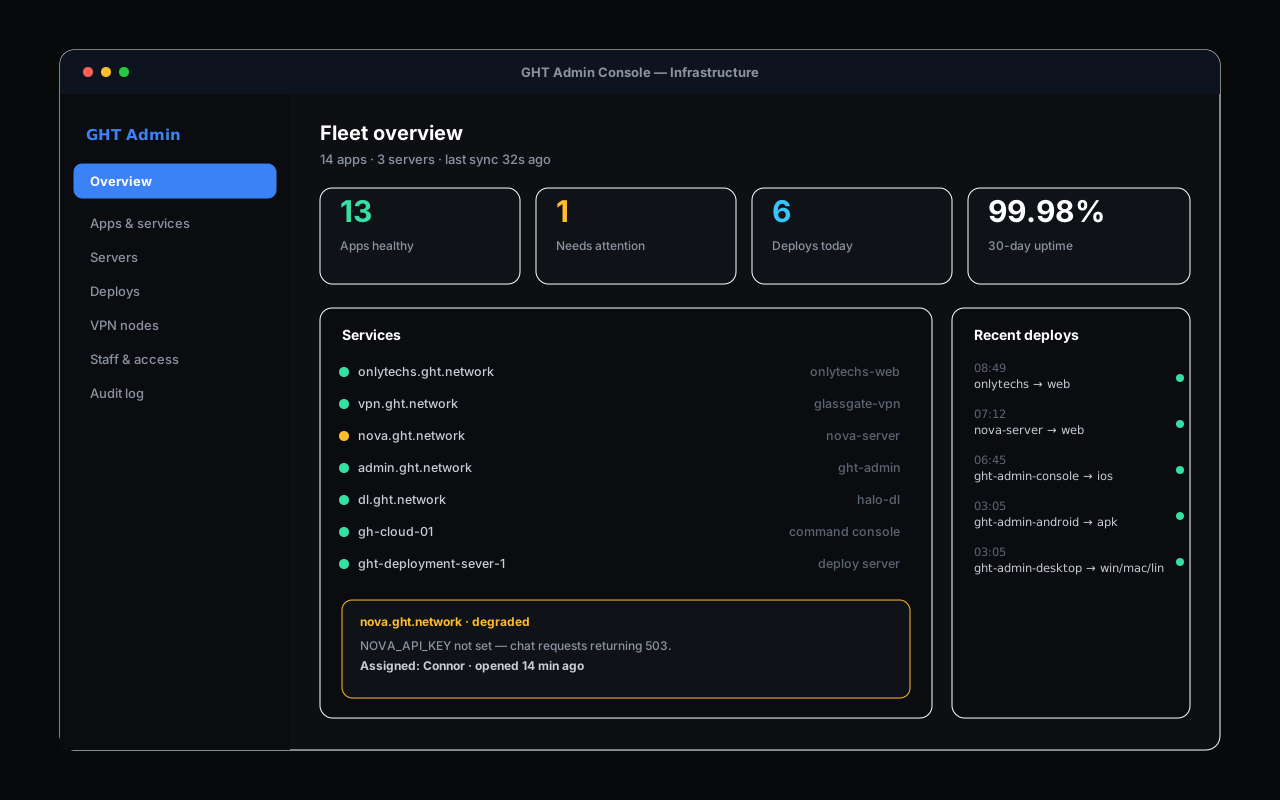
A look at GHT Admin Console. Click any screen to enlarge.
Built for the job
Fleet overview
Every app and service, health status, uptime, and what’s deployed where, on one screen.
Deploy activity
A live feed of what shipped, when, and to which target, across the whole portfolio.
VPN & server health
Node status for the private network and every server GHT operates.
Staff & access
Manage who has access to what, gated by real GHT accounts, not shared credentials.
GHT Admin Console: The command console for everything Glass House runs.
Tell us what you’re trying to build and we’ll get you set up, or point you to the right download.